TOKQI C22 Smart AI Face-Tracking Gimbal & Tripod


TOKQI C22 Smart AI Face-Tracking Gimbal & Tripod
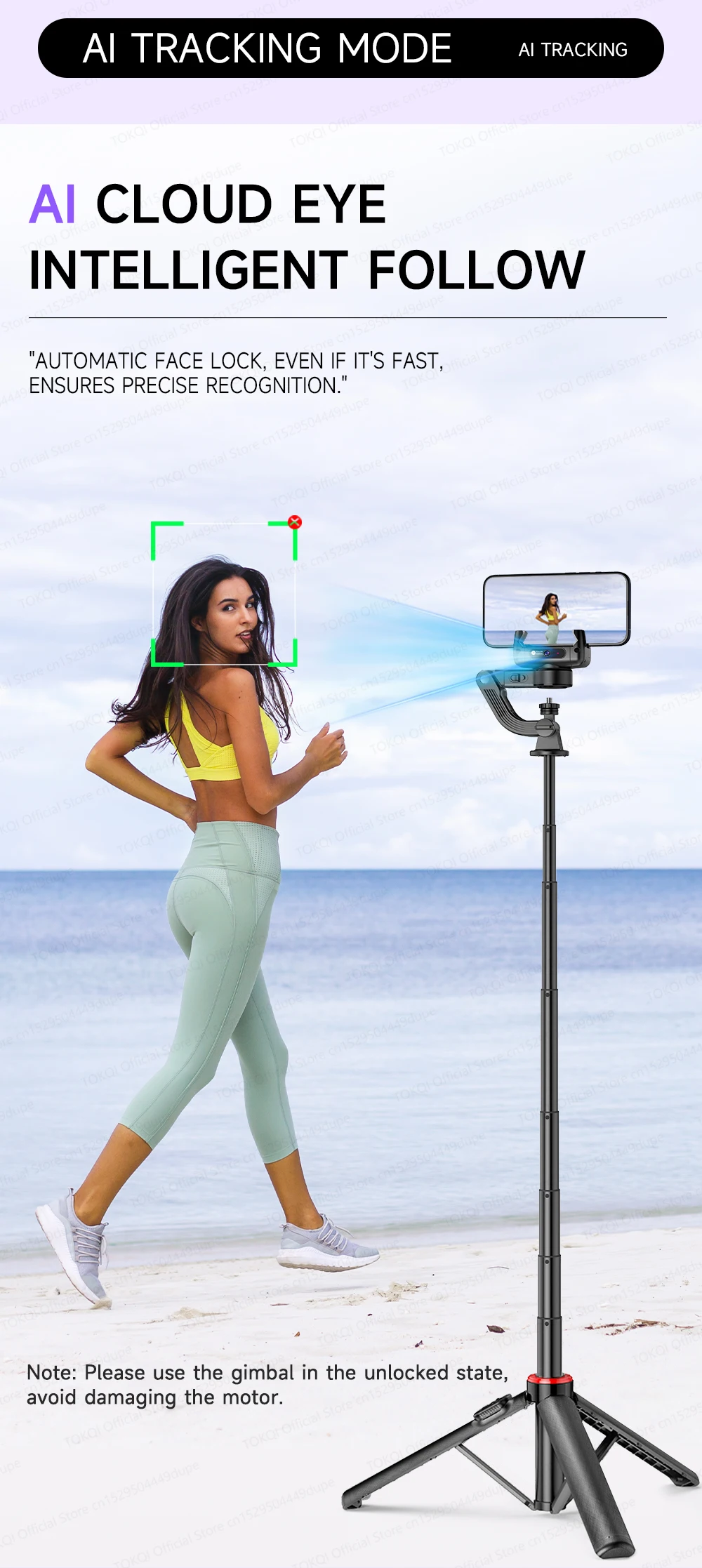
- AI Smart Face Tracking: Powered by an independent internal lens that locks onto your face and tracks your movement smoothly in a full 360-degree rotation. No app downloads required—just turn it on and move freely!
- Intelligent Anti-Shake Core: Shoot cinematic, buttery-smooth cinematic footage even while walking, running, or vlogging on the move.
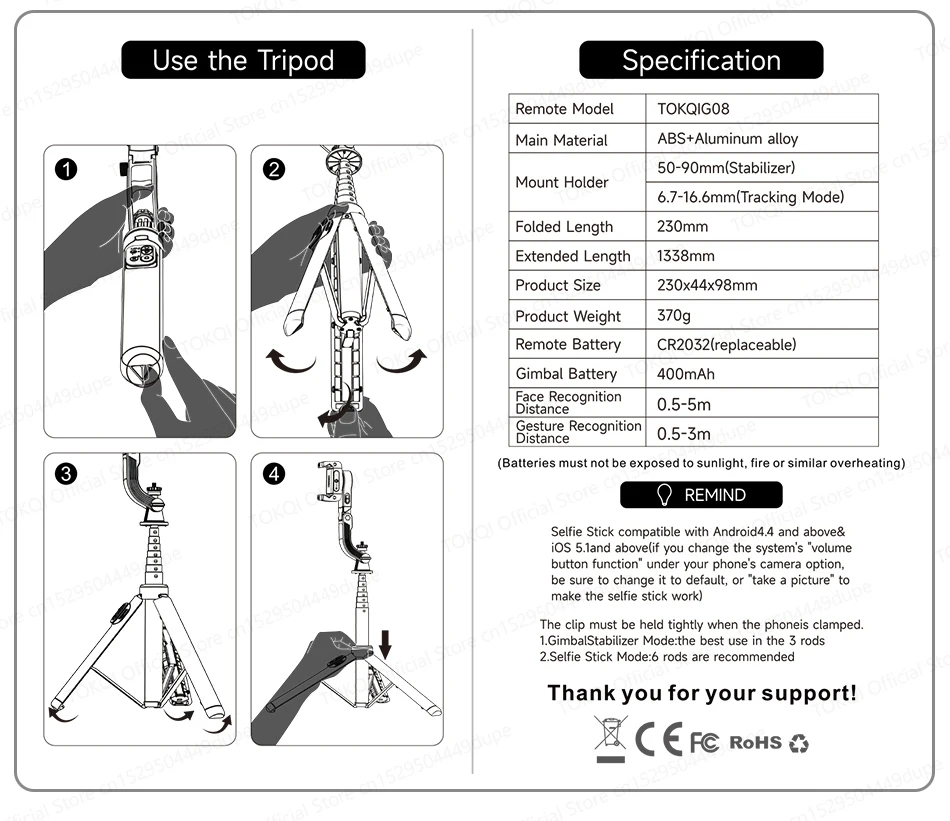
- Massive 1.3-Meter Extension: Transforms instantly into a premium aluminum alloy tripod that expands up to 1338mm (52.6 inches) for breathtaking wide shots and group photos.
- Detachable Remote Control: Snap photos, swap modes, and trigger recording from afar using the sleek Bluetooth shutter remote.
- Cinematic Vertical Shooting: Effortlessly switch between horizontal movie mode and vertical mode for crisp TikToks, Instagram Reels, and YouTube Shorts.
- Brand & Model: Genuine TOKQI C22 Premium Edition
- Premium Materials: High-Grade ABS Impact Shielding + Aircraft-Grade Aluminum Alloy
- Ultra-Lightweight Frame: Only 370 grams—perfect for traveling and daily vlogging.
- Pocket-Friendly Folded Length: Compacts down to just 230mm (9 inches) to easily slide into your backpack or purse.
- Wireless Connectivity: Seamless Bluetooth pairing with smart memory recall.
- System Compatibility: Fully optimized for Android 8.0+ and iOS 13.4+.
- Universal Smartphone Fit: Securely locks any device with a width between 50mm to 90mm and a thickness up to 14mm (compatible with all major iPhone, Samsung, and Pixel models).
- Remote Battery: Uses a long-lasting, easily replaceable CR2032 lithium coin cell.
- Safety Certifications: Officially CE, FCC, and RoHS certified for international safety and charging standards.
- 1x TOKQI C22 AI Tracking Gimbal
- 1x Detachable Multi-Function Bluetooth Remote
- 1x Heavy-Duty Extendable Desktop Tripod Base
- 1x USB Premium Charging Cable
- 1x Quick-Start User Manual

AI Tracking Mode
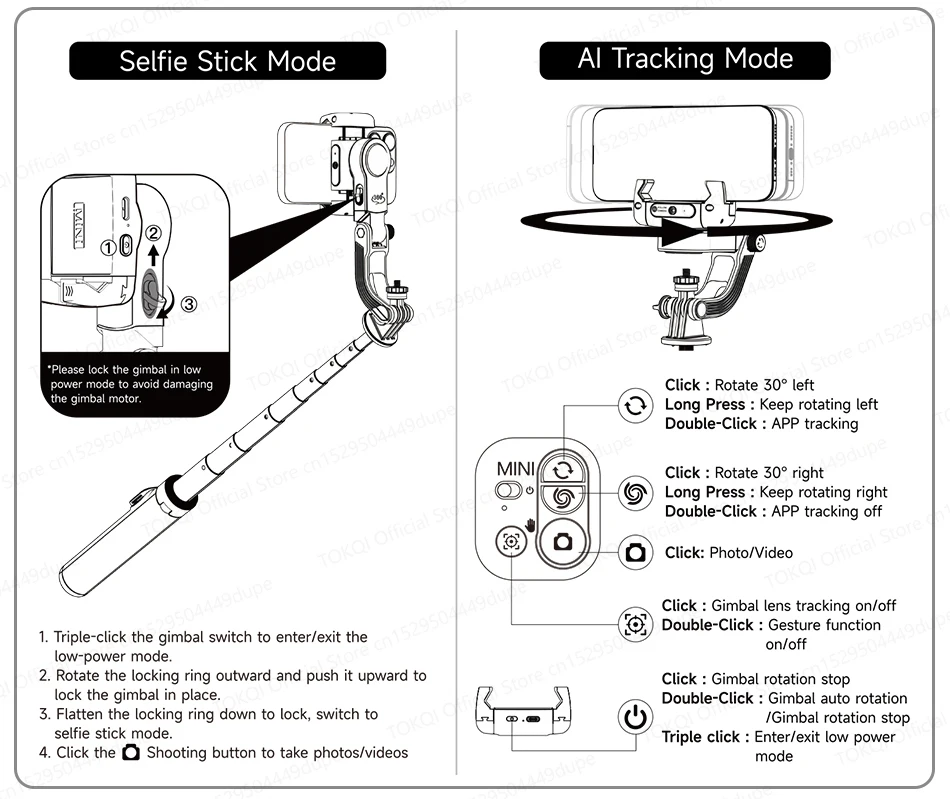
Note: Please use the gimbal in the unlocked state, avoid damaging the motor.
Desktop Followers
Suitable for live broadcast, online education
and conference recording
Handheld Tracking
Ideal for travel photography and vlogging Recording.


The AI Camera Is Locked In The "C” Position
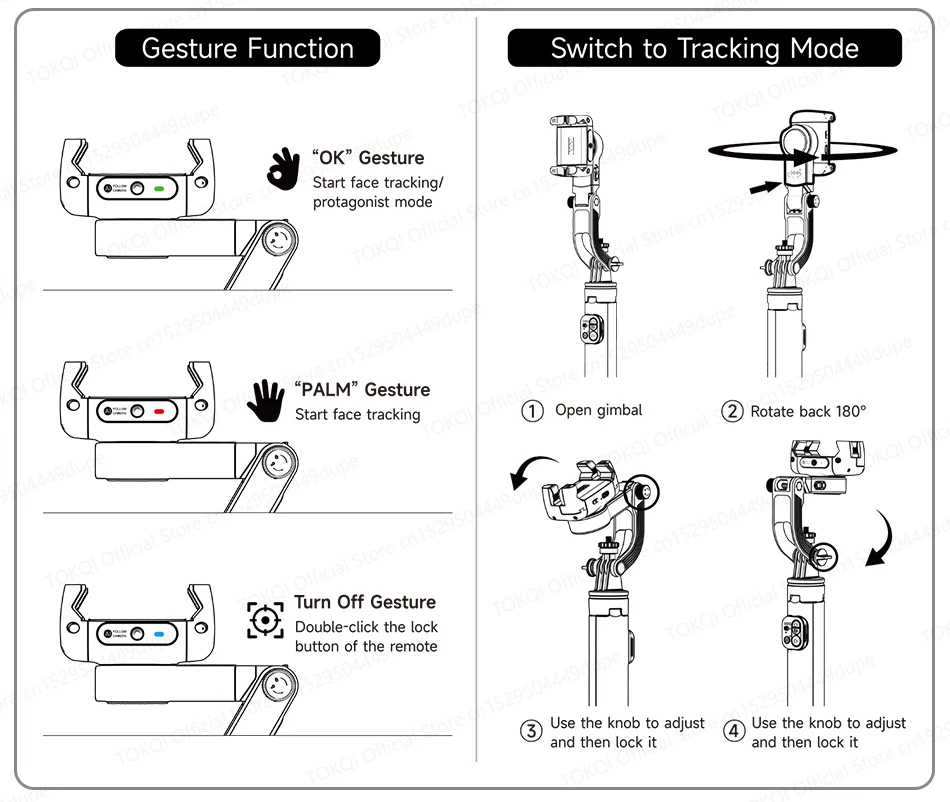
Gesture control tracking on/off.
-“OK” Protagoniset Mode:
You, always in “c” position.
-Lock You In Even If You're Covered
A shory cover-up won't stop tracking.
-360° Surround Shot
Seconds of panoramic blockbuster.
-Eleavtion Shot
Shooting for creative perspective


Stabilizer Mode
No matter how you shoot, It stays stable!


Intelligent Movement gyroscope
Intelligent anti-shake function for follow-up shooting, easy to shoot.
-360° Spin Shot
-Sport Steady Shot
-Low Angle Shot
-Travel Vlog


Selfie Stick Mode
Stabilized tripods for professional and stable shooting.


1.338m/52.68in Perfect Length
Quick switch to selfie stick.
Rear shotsare clearer.


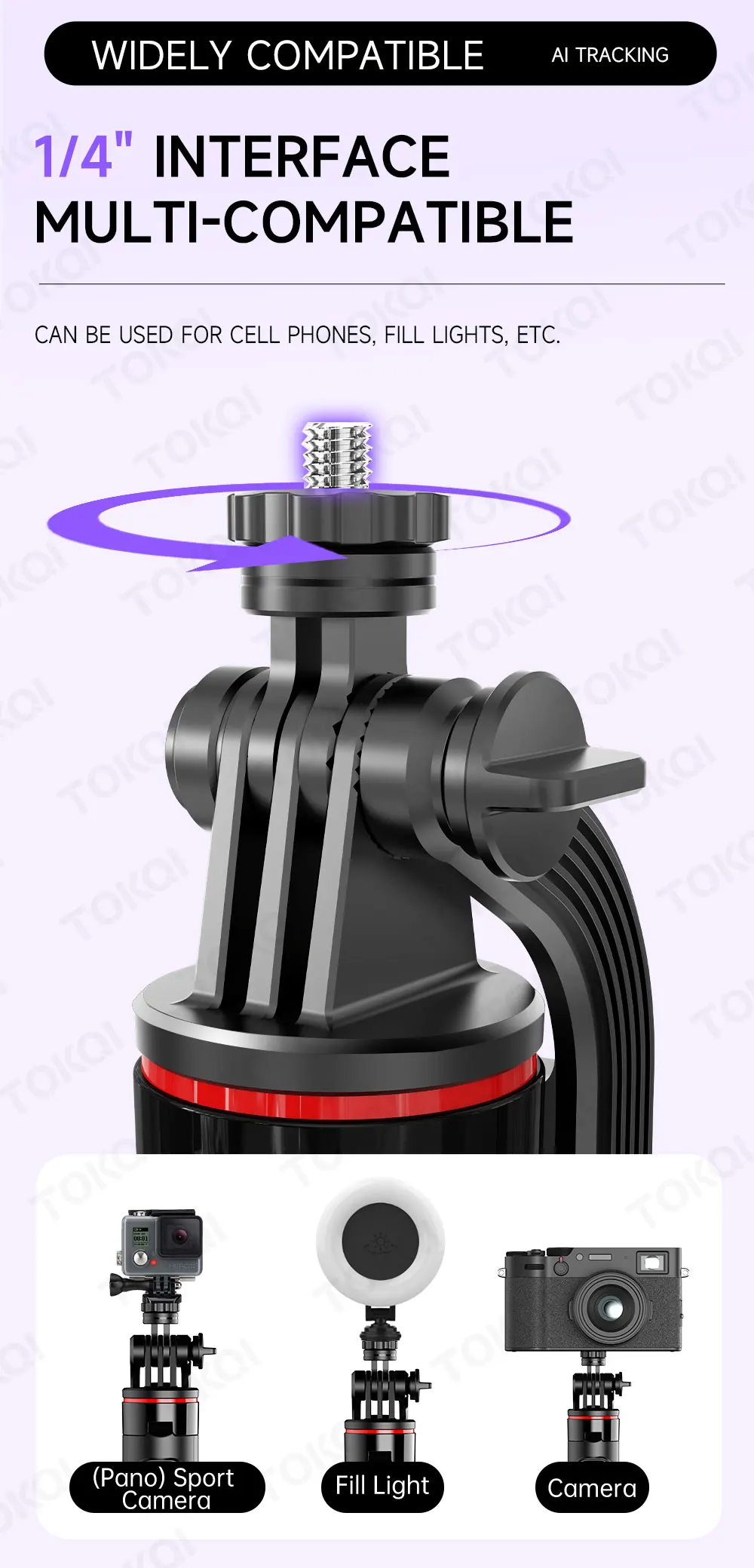
Widely Compatible
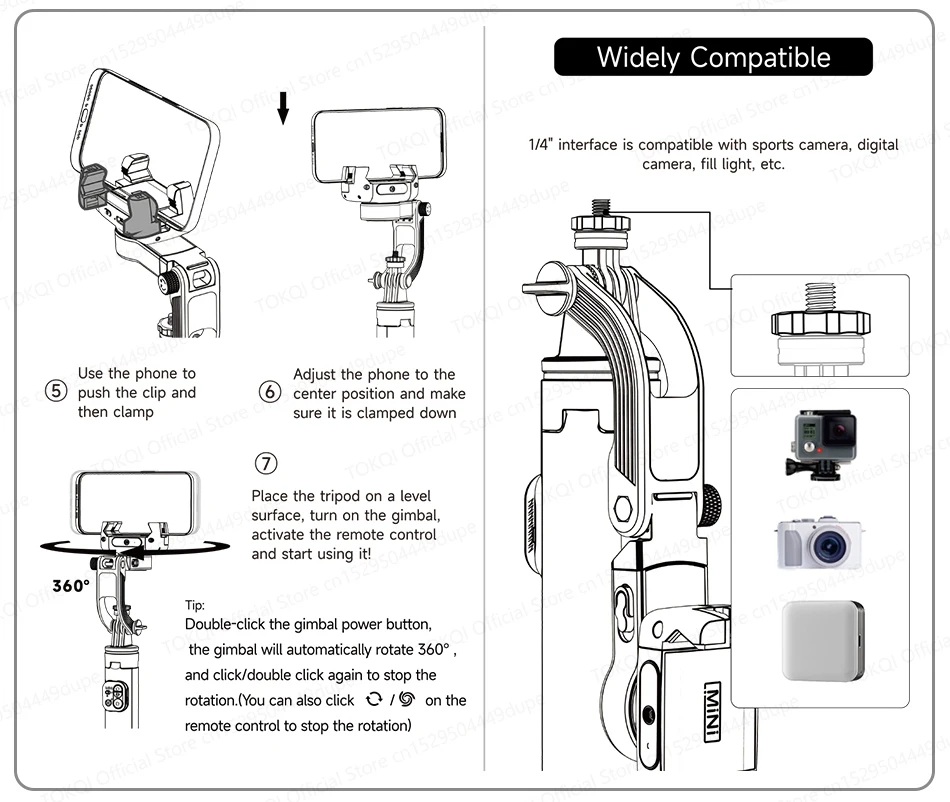
1/4" Interface Multi-compatible
Can be used for cell phones, fill-in lights, etc.
Optional DO7 Ring Light
3 color and 3 brightness for each color.

Remote Control
Embedded Design
1.Shooting
2.Stabilizer mode
-Spinshot
-Pov mode
-Horizontal and vertical
3.AI Tracking Mode
-Rotation
-Gesture Function


Pocket-sized And Portable

With APP (Gimbal Show)
-Face Filter
-Smart Tracking
-Gesture Function
-PANO & CloneMe
-DYNA-ZOOM
-TIMELAPSE


Product Parameters

C22 AI Gimbal Stabilizer User Manual
1. Part Description
2. Remote Control
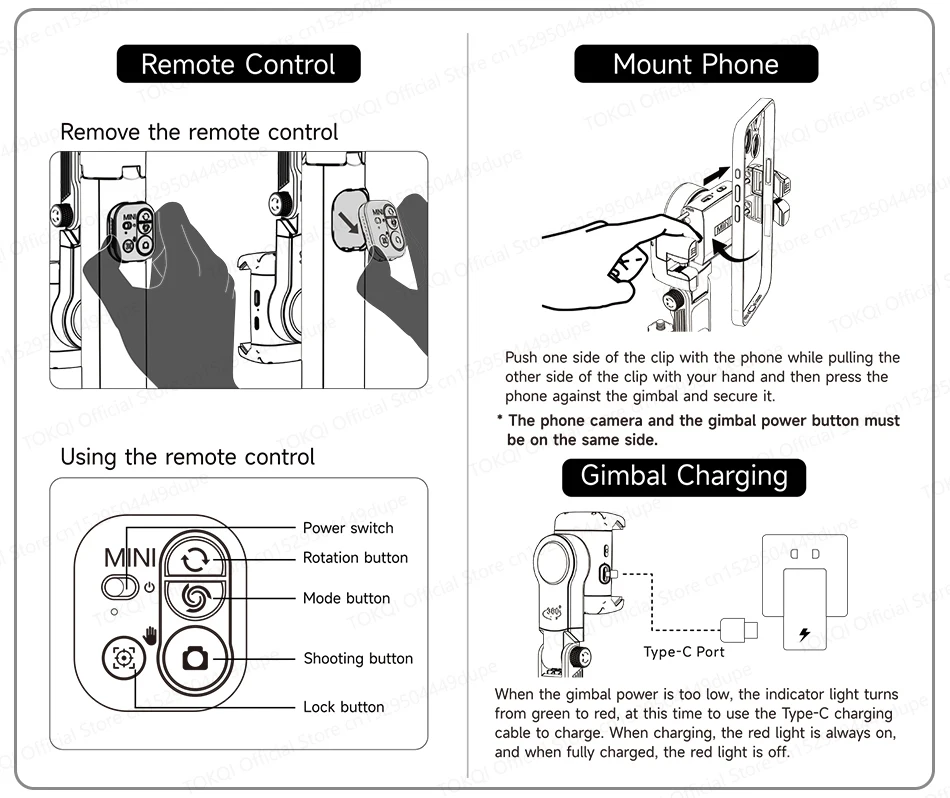
Remove the remote control.
Using the remote control.
3.Mount Phone
Push one side of the clip with the phone while pulling the other side of the clip with your hand and then press the phone against the gimbal and secure it.
* The phone camera and the gimbal power button must be on the same side.
4. Gimbal Charging
When the gimbal power is too low, the indicator light turns from green to red, at this time to use the Type-C charging cable to charge. When charging, the red light is always on, and when fully charged, the red light is off.
5. Wireless Connection
First time connection:
---Mount the phone in the center of the phone clip
---Long press the gimbal power button to turn on the gimbal, the green light flashes to enter the pairing state, search for “Gimbal Al-XXXXXX” in the phone to match, after successful pairing, the green light is always on.
*The phone camera and the gimbal power button must be on the same side.
6.Stabilizer Mode
7. Selfie Stick Mode
*Please lock the gimbal in low power mode to avoid damaging the gimbal motor.
8. AI Tracking Mode
9.Gesture Function
10.Switch to Tracking Mode
11.Widely Compatible
12. Use the Tripod
13.Specification